

No results found for your search.
Select Country
How to set Robots.txt and Meta Robots Tag
While most SEO specialists are aware that robots.txt and the Meta Robots tag are used to govern search engine bot access to a website, many are also unaware of how to use them effectively. Both have distinct advantages and disadvantages, and it's critical to strike a balance between which to employ and when. To address this issue, we've outlined the best practices for setting up the robots.txt file and Meta Robots tags in this article.
Robots.txt
Robots.txt is a text file that tells search engine robots which parts of the website they can crawl and which parts they can't. It's part of the Robots Exclusion Protocol (REP), which is a set of guidelines for how robots can crawl and index information on the internet. It may appear complicated and technical, but creating a robots.txt file is simple. Let's get started!
The following is an example of a simple robots.txt file:
User-agent: *
Allow: /
Disallow: /thank-you
Sitemap: https://www.example.com/sitemap.xml
The most significant directives in a robots.txt file for guiding robots are Allow and Disallow. Let's have a look at what they signify.
Syntax
User-agent – The user agent name for which the directives are intended is specified here.
The symbol * denotes that the directives are intended for all crawlers. Other possible values for this parameter include Googlebot, yandexbot, and bingbot, among others.
Allow: This command tells Googlebot that the specified Uniform Resource Locators are crawlable (URLs)
Disallow: This command prevents Googlebot from crawling the URL you specify (s).
Sitemap: This command is used to specify your website's Sitemap URL.
In this case, User-agent: * denotes that the set of commands is relevant to ALL types of bots.
Allow: / tells crawlers that they can crawl the entire website except for the pages that aren't allowed in the file. Finally, Disallow: /thank-you tells Googlebot not to crawl any URLs that include /thank-you.
The User-agent, Allow, and Disallow instructions carry out the primary function of a robots.txt file, which is to allow and prohibit crawlers.
Best Robots.txt Practices
Here are some pro-SEO tips that you should follow when setting up your own robots.txt file.
- First and foremost, please do your homework and figure out which parts of your website you don't want indexed. Do not copy or reuse another person's robots.txt file.
- Ensure that your robots.txt file is located in the root directory of your website so that search engine crawlers can readily access it.
- Because it is case-sensitive, do not call your file anything other than "robots.txt."
- In robots.txt, always include your sitemap URL to make it easier for search engine bots to find your website pages.
- Robots.txt should not be used to hide private information or future event pages. Any person can access your robots.txt file by simply putting /robots.txt after your domain name because it is a public file. Because anyone may see the pages you want to hide, it's best not to employ robots.
- Create a separate and customised robots.txt file for each of your root domain's sub-domains.
- Before you go live, double-check that you aren't blocking anything you don't want to.
- To discover any mistakes and ensure that your directives are operating, test and validate your robots.txt file using Google's robots.txt testing tool.
- Create a separate and customised robots.txt file for each of your root domain's sub-domains.
- To discover any mistakes and ensure that your directives are operating, test and validate your robots.txt file using Google's robots.txt testing tool.
- Do not link to any of your website's pages that are prohibited by the robots.txt file. Internal links will cause Google to crawl those pages if they are linked.
- Make sure your robots.txt file is formatted correctly.
- On a new line, each directive should be defined.
- When allowing or disallowing URLs, keep in mind that they are case-sensitive.
- Except for * and $, no other special characters should be used.
- To provide further clarity, use the # symbol. Lines with the # character are ignored by crawlers.
- What pages should you use the robots.txt file to hide?
- Pages for pagination
- Variations of a page's query parameters
- Pages for your account or profile
- Pages for administrators
- In the shopping cart
- Thank you pages
- Block pages that aren't linked from anywhere and aren't indexed with robots.txt.
- When it comes to robots.txt, webmasters frequently make blunders. These are discussed in a separate article. Check it out and stay away from them – Typical robots.txt blunders
Robots Tags
A robots.txt file merely tells the crawler which parts of the website it can access. It will not, however, tell the crawler whether or not it can index. To assist with this, you may employ robots tags to instruct crawlers on indexing and a variety of other tasks. Meta Robots and X-robots tags are the two forms of robot tags.
Meta Robots Tag
A Meta Robots tag is a fragment of HTML code that tells search engines how to crawl and index a page. It's found in a web page's head> section. A Meta Robots tag looks like this:
<meta name=”robots” content=”noindex,nofollow”>
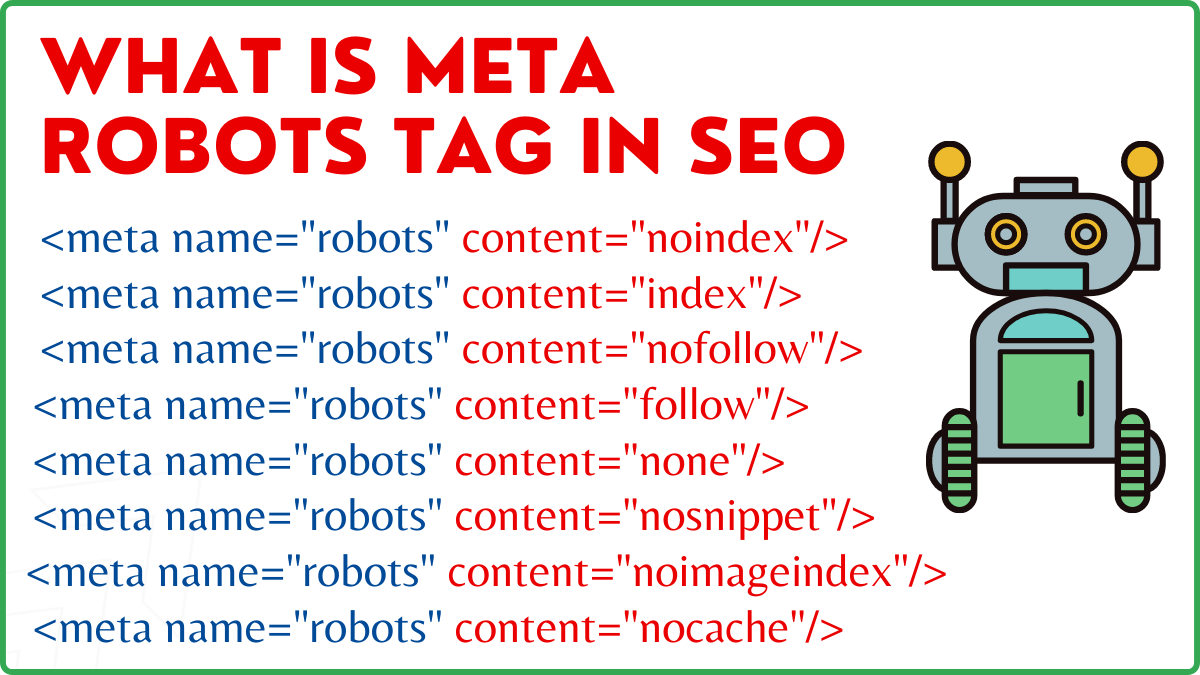
Name and content are the two attributes of the Meta Robots tag.
Name attribute
The values defined for the name attribute are the names of the robots, i.e. (Googlebot, MSNbot, etc.). As shown in the example above, you can simply define the value as robots, which indicates the directive will apply to all sorts of crawling robots.
Content Attribute
In the content field, you can define a variety of different types of values. The content attribute instructs crawlers on how to crawl and index the page's content. If no robots meta tag is present, crawlers will treat the page as an index and follow it by default.
Here are the different types of values for the content attribute
- all: This directive tells crawlers that they can crawl and index anything they want. This works in the same way as the index and follow instructions.
- index: The index directive tells crawlers that they can index the page. This is taken into account by default. This does not have to be added to a page in order for it to be indexed.
- noindex: Crawlers are not allowed to index the page. If the page has already been indexed, the crawler will be instructed to remove it from the index by this directive.
- follow: Search engines are instructed to follow all links on a page and to pass link equity.
- nofollow: Search engines aren't allowed to follow links on a website or pass any equity.
- none: This is similar to the noindex, nofollow directives.
- noarchive: The cached copy of a page is not displayed on the Search Engine Results Page (SERP).
- nocache: This directive is similar to noarchive, however it is only supported by Internet Explorer and Firefox.
- nosnippet: The page's expanded description (also known as the meta description) is not displayed in the search results.
- notranslate – This prevents Google from providing a translation of the page in the SERP.
- noimageindex – This prevents Googlebot from crawling any pictures on the website.
- unavailable_after –After the specified date/time, don't show this page in the search results. It's similar to a noindex tag with a timer.
- max-snippet: This directive allows you to specify the maximum number of characters that Google should show in a page's SERP. The amount of characters in the sample below will be limited to 150.
- Eg – <meta name=”robots” content=”max-snippet:150″/>
- max-video-preview –A maximum amount of seconds for a video sample preview will be established. In the case below, Google will display a 10-second preview —– <meta name=”robots” content=”max-video-preview:10″ />
- max-image-preview – This instructs Google on the size of the image it should display for a page in the SERP. There are three options available.
- None – No image snippet will be displayed.
- standard – Default image preview will be used
- large – Largest possible preview may be displayed
X Robots Tag
Only at the page level can the Meta Robots tag regulate crawling and indexing. The sole difference between the X-robots tag and the Meta Robots tag is that the X-robots tag is defined in the HTTP header of a page to manage crawling and indexing of either the entire page or selected elements of it. It is mostly used for non-HTML page control, crawling, and indexing.
Example of X-Robots tag
The X-robots tag employs the same set of directives as the Meta Robots tag, as shown in this screenshot. You'll need access to a.htaccess,.php, or server configuration file to change the headers in order to use the X-robots tag.
Best SEO Practices For Robots Tags
1) Meta Robots and x-robots should not be used on the same page because one of them will become redundant.
2) You can use the Meta Robots tag with directives like noindex, follow if you don't want your pages to be indexed but still want to convey link equity to linked pages. Instead of preventing indexing with robots.txt, this is the ideal method for controlling indexing.
3) To get your website indexed, you don't need to include index or follow directions to each page. It is taken into account by default.
4) If your pages are indexed, don't use robots.txt to stop them and instead utilise Meta Robots. Because crawlers need to crawl the page in order to examine the Meta Robots tag, and robots.txt blocking prevents them from doing so. In other words, your Meta Robots tag will be obsolete.
In these circumstances, use the robots meta tag first and then wait for Google to de-index your sites. After they've been de-indexed, you may use robots.txt to prevent them and save money on crawling. However, because they can be utilised to convey link equity to your vital pages, this should be avoided. Only use robots.txt to prohibit de-indexed pages if they are completely useless.
5) Control crawling of non-HTML files such as photos, PDFs, flash or video with the X-robots tag.
Conclusion
Controlling the crawling and indexing of your website requires the use of robots.txt and robots tags. There are several options for controlling how spiders reach your site. However, not all of them will be effective in resolving your problem. If you wish to remove some pages from the index, for example, just banning them in the robots.txt file will not work.
The most important thing to remember here is to figure out what your website requires and then pick a clever strategy to deal with it when sites are blocked. We hope that this advice aids you in determining the best option for you.
What approach do you employ to prevent pages from being blocked? Please share your thoughts in the comments box below.